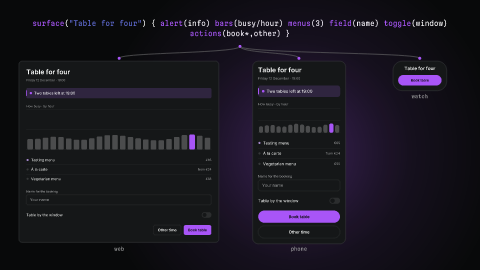
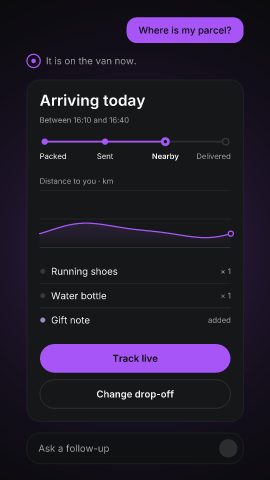
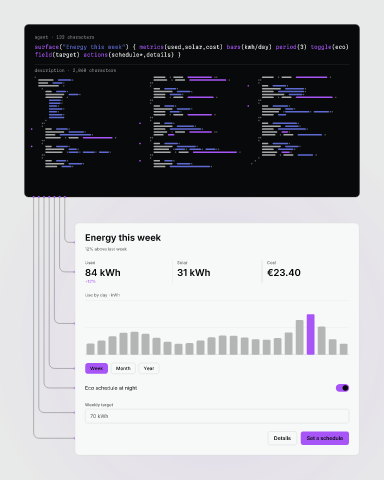
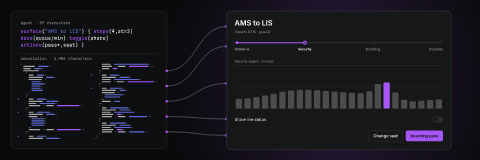






An agent writes one short line, a server turns it into a long list of components, and an app draws them with its own parts. This draws all three, or the same card in three renderers.
What makes it Agent UI
These are the design choices this generator makes or lets you set. Where a choice says “Measured”, Morphogeny changed that control alone, kept everything else, and measured the picture: a number that moves with the choice, not proof that the picture reads as the style.
- Charts, maps, isotypes, technical drawings. “View”: Line, description, surface.
- Fields defined by rows and columns; every element snaps to modules. “View”: Three renderers.
- Operating-system and mobile interfaces. “View”: In a conversation.
- Several reading levels: headline, deck, captions, data. Set by “Layered information”.
- Light elements on black or deep fields. “Ground”: Dark ground. Measured on the opening picture with “Dark ground”: brightness of the ground 0.8%.
- Paper-white or pale fields dominate. “Ground”: Light ground.
- Soft corners, capsules and blobs. Set by “Rounded corners”.
- Smooth blends, fades or spectral ramps. Set by “Glow”.
- Neutral, rational sans: Akzidenz-Grotesk, Helvetica, Univers. Always.
- Fixed-width typewriter or code letterforms. Always.
- A few rules, dingbats or flourishes. Always.
How this generator works
- Every picture is one surface and its description: a short line the agent writes, the long list of components it expands into (data left as paths), and the interface an app draws from it with its own parts.
- The description is drawn as a minimap, one bar per token coloured by kind, and a line runs from each block to the part it became; or the same description is drawn by three renderers, a web card, a phone and a watch, each keeping what fits.
- In motion it streams forwards: the line types, the description runs down, each part arrives as its block completes, then the surface leaves upwards and the stream starts again.
What it never does:
- No logos, product names, devices or brand look: the renderers are plain web, phone and watch skins, not any company’s system.
- No real data and no real people: numbers, logs, names and places are invented examples, and the default is not a copy of any demo.
Every picture is a recipe: the variation number and the settings, kept in the page's address. Copy the link and the same picture comes back, in any browser. Random (or R) draws a new variation; ← and → step through them; S shuffles the settings; C borrows another style's colours.
About Dark Tech Minimalism
Agents used to answer in paragraphs. Now they can answer with an interface: a card with numbers, a chart, a list and buttons, which the app on your phone or in your browser draws with its own components. The agent only describes what goes where. The data it describes stays with the app, as paths the app fills in.
This generator draws that translation in the look of dark developer tools: near-black ground, one accent, a neutral grotesque for the interface and a monospace for code. The agent’s line is set in type. The description it expands into is drawn as a minimap, one bar per token, data paths in the accent, and a line runs from each block to the part it became.
Three views show it differently: the line, the description and the surface side by side; one description drawn by a web, a phone and a watch renderer, each keeping what fits; or the surface as an answer in a conversation. In motion it streams, part by part, and then streams again.
Dark Tech Minimalism: 2019–today. What the controls mean: Help.
Why an agent should answer with an interface
A wall of text is a poor answer to a question about a live system. If you ask why checkout is failing, you want the error rate, how many people are affected, the last few log lines and a button to acknowledge the incident. A chat reply can list those things, but you cannot press it, sort it or watch it change.
Open protocols for agent interfaces solve this by letting the agent send a description instead of finished markup. The description names components, such as a card, a row of metrics, a chart, a text field and two buttons, and says how they nest. The app that receives it draws each one with its own native parts, so the answer looks like the rest of the app on every platform.
The agent never needs to see the numbers. It can point a metric at a path in the app’s data, and the app fills in the value when it draws. That keeps private data out of the model and keeps the figures current.
A short line becomes a long description
Writing the full description is slow and costly for a model, because every component needs an id, a type and its properties. So the agent can write a compact line instead, one word per component, and a server expands it. In the generator the line runs to between 40 and 180 characters, and the description to thirteen to twenty-two times that.
Both counts in the picture are real: they are the lengths of the line and of the description drawn beside it. The description is a flat list of components that refer to each other by id, the way these protocols keep a tree easy to stream and to update one part at a time.
How the generator draws it
The subject sets what the agent is answering: an incident, a table booking, a parcel, a flight or a week of energy use. Layered information sets how many components it asks for, and the seed chooses which. A small frame keeps the parts that fit, dropping the least telling first, so a banner gets a short card rather than a tiny one.
The description is drawn as a code minimap: each token is a rounded bar, keys in a muted tone, text in one ink, numbers in another and data paths in the accent. In the view with three renderers, the web card reflows to its column, the phone stacks its buttons full width and rounds its corners more, and the watch keeps only the heading, one figure and the main button.
Colours come from the palette by role. The ground is its darkest or lightest colour, the cards sit a step away from it, the code panel stays dark like an editor, and every ink is checked to read at 3:1 on the card. Buttons, fields, chips and labels are left out of a stand-in, so the picture can sit behind a page’s own words.
What to make with it
Use the landscape view for a slide or an article header about agents and interfaces, the conversation view for a phone-sized post, and the three renderers for anything about one description and many platforms. Type your own title to set the card’s heading, or leave it and let the subject choose.
In motion the surface streams in: the line types, the description runs down, each part arrives as its block completes, then the card leaves upwards and the stream begins again. Every number, log line, place and name in it is an invented example.
Use it from code
The recipe below draws the picture this page opens with. Copy recipe gives you the one on screen. Agents can render recipes to SVG or PNG through Morphogeny's MCP server (morphogeny_render); the same recipe always gives the same SVG.
{
  "tool": "agent-ui",
  "v": 1,
  "seed": 3,
  "format": "landscape",
  "params": {
    "title": "Title from the agent",
    "view": "wire",
    "subject": "incident",
    "parts": 7,
    "ground": "dark",
    "corners": 12,
    "glow": true,
    "links": true
  },
  "palette": "dark-tech-minimalism"
}
Open this recipe: /agent-ui/#seed=3&v=1. A plain-text version of this page:/agent-ui.md.